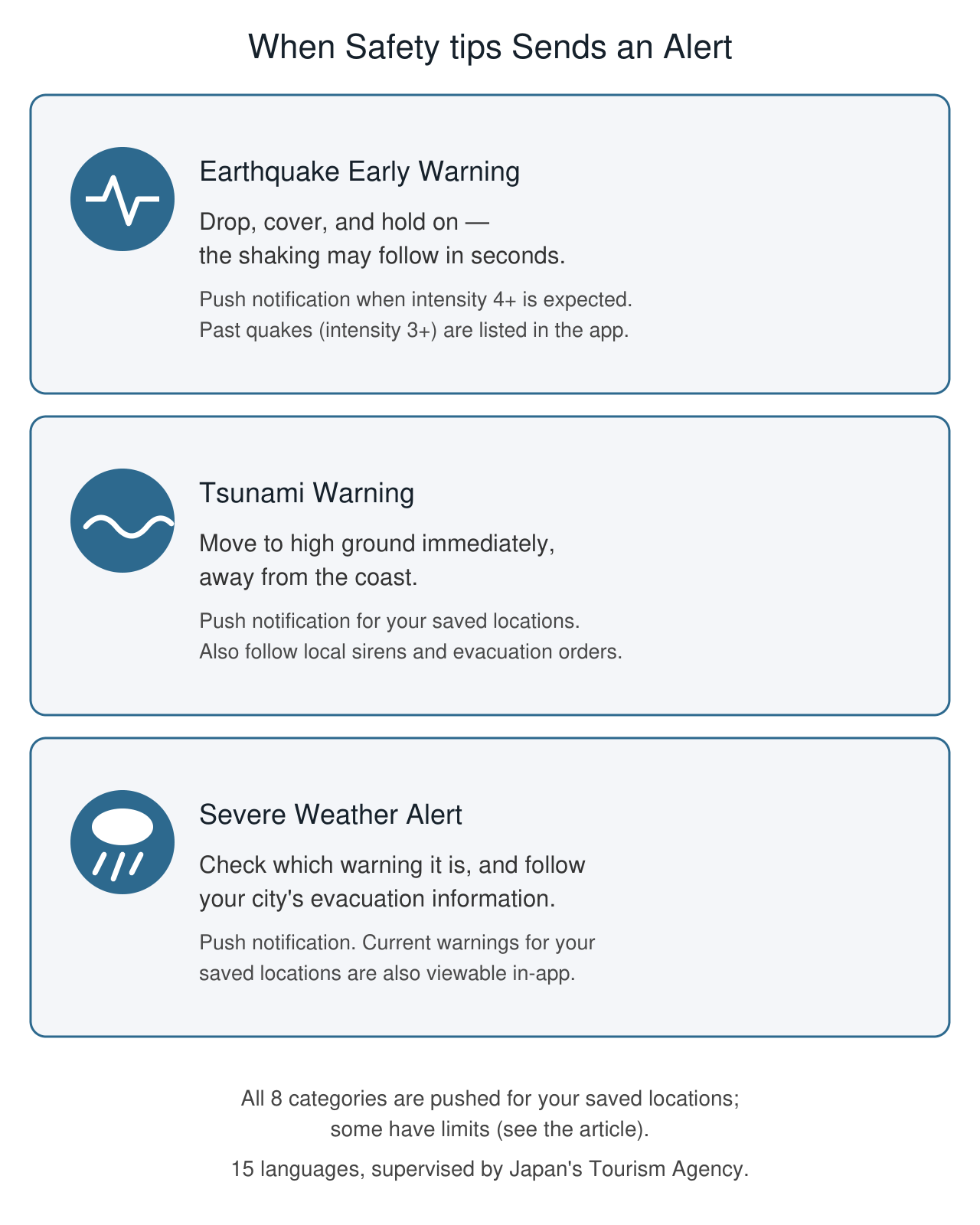
Short answer: Safety tips is a free disaster-alert app supervised by the Japan Tourism Agency. It covers 8 alert categories in 15 languages, and the developer's current page says all eight are sent as push notifications for the locations you choose (earthquake early warnings only when shaking of intensity 4 or higher is expected there).
Official descriptions of Japan's multilingual disaster app are mostly written for short-term visitors — even the Japan Tourism Agency introduces it as a tool for foreign tourists — “download this before your trip.” That framing misses the people who actually need it most: residents who'll go through a real earthquake, typhoon season, or tsunami warning while it's happening, not as a travel-safety checklist item they forgot about the moment they landed.
The app is called Safety tips. It's supervised by the Japan Tourism Agency and developed by RC Solution Co. As of the end of October 2026, it had been downloaded about 1.92 million times. It's free, and the developer's own page lists eight categories of information: earthquake early warning, tsunami warnings, volcanic warnings, severe weather warnings, tropical cyclone (typhoon) information, heat-illness warnings, civil protection information (including ballistic missile alerts), and evacuation information.
Push Notification vs. Checking the App Yourself
These aren't the same thing. The developer's current product page says the app pushes all eight categories for your saved locations, with some limits: earthquake early warnings are pushed only when shaking of intensity 4 or higher is expected there, civil protection alerts cover ballistic missiles only, and evacuation information comes only from municipalities that use the L-Alert system. RC Solution's older support page lists only four push types (earthquake early warnings, tsunami warnings, eruption alerts, and special weather warnings), so don't treat a missing notification as an all-clear — open the app and check. Several categories also have a separate in-app screen you can open any time to check current or recent status, independent of whether a notification has fired: past earthquakes of intensity 3 or higher (up to 10 records), currently-issued volcanic warnings, currently-issued severe-weather warnings for your selected locations, current typhoon information, and the heat-illness risk level at your chosen locations right now. For routine checks, keep notifications on and open the app to see what's currently in effect. If you’re near the coast and feel strong or prolonged shaking, evacuate immediately to high ground or a tsunami evacuation building. Do not wait for a phone alert. See the Japan Meteorological Agency’s tsunami guidance.
Setting It Up Takes About Two Minutes
And one step matters more than it looks:
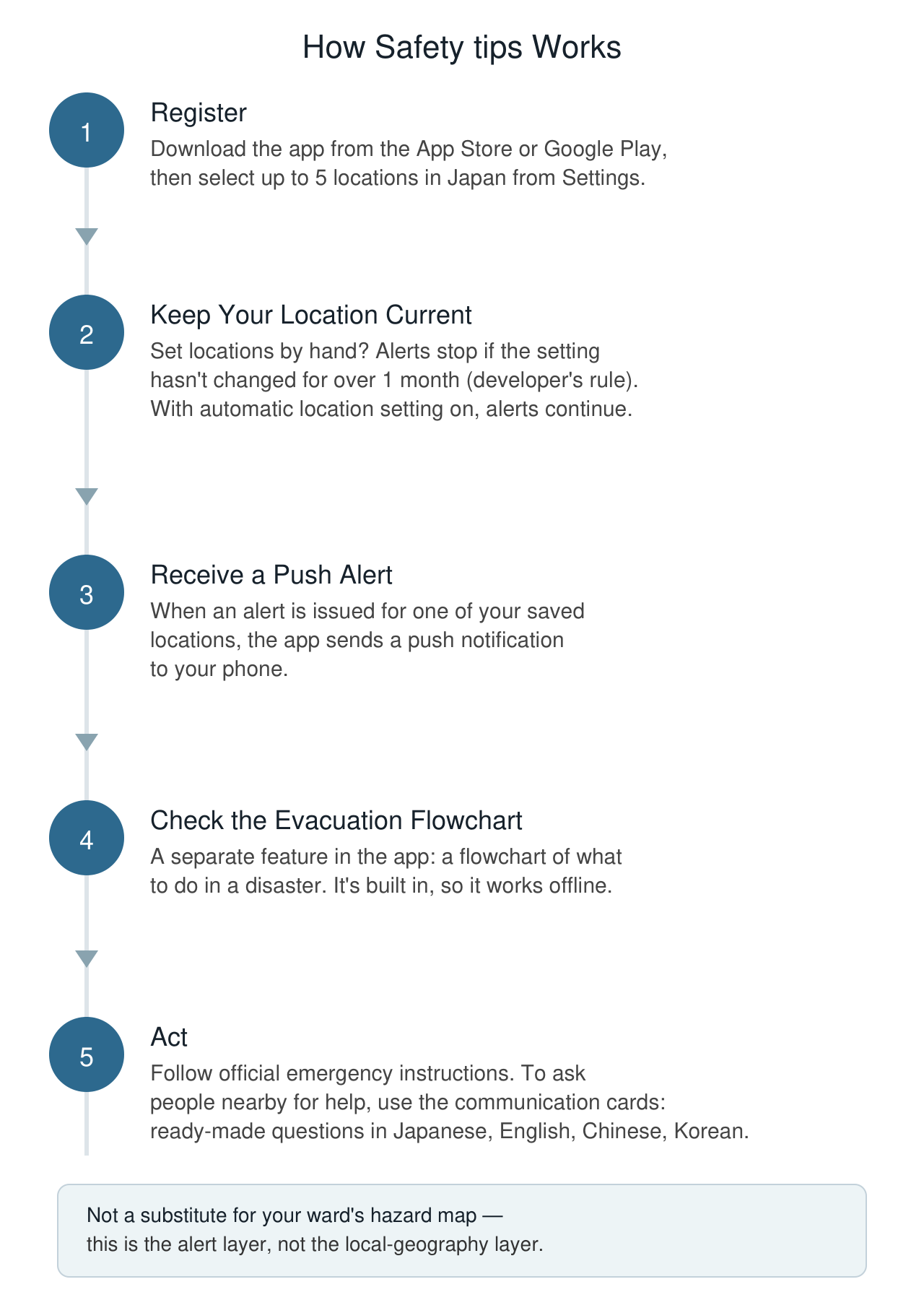
- Download it — App Store for iPhone, Google Play for Android.
- Before you use it for the first time, go to Settings and choose up to five locations in Japan you want alerts for — your home, your workplace, anywhere you travel often.
- Keep your saved location current. The developer's own terms, quoted closely: a device “which has not been changed a prediction point for more than 1 month from final change date of setting will not be able to receive notifications.” In plain terms: if you set your locations once and never change them, that device stops getting notifications a month after the last change.
- Or turn on automatic location setting: the developer says notifications keep arriving even after a month in that case.
Once that's set, alerts for your chosen locations arrive as push notifications, as long as you haven't let your device go past the one-month no-update mark described above.
Language Coverage
15 languages — English, simplified and traditional Chinese, Korean, Japanese, Spanish, Portuguese, Tagalog, Indonesian, Vietnamese, Nepali, Thai, Khmer, Burmese, and Mongolian.
It Also Powers Other Apps
The Japan Tourism Agency also offers a Safety tips API, so other companies' apps can receive the same disaster information without building their own system from scratch.
What This App Is Not, and Why That Matters
Safety tips tells you that something's happening — an earthquake, a typhoon approaching your selected area, a heat-illness warning — and hands you a general flowchart for what to do next. It is not your ward's hazard map (ハザードマップ). Check your municipality’s hazard map in advance for local risks and for designated emergency evacuation sites that match the type of disaster. Designated shelters are for temporary stays. Check your municipality’s instructions to find out which shelters are open. Safety tips doesn't know any of that about you — it's the alert layer, not the local-geography layer. You need both: Safety tips to know something is happening right now, your ward's hazard map (usually available as a PDF on your city's website, often in multiple languages) to know what that means for the specific building you're standing in.
Should You Install It?
If you're a foreign resident and don't have this installed: it's free, it's supervised by the Japan Tourism Agency, and it covers 15 languages and eight alert categories. If you're hurt or sick rather than facing a disaster, see how to get medical help in Japan without fluent Japanese.
Official sources
Checked November 2026.
- Japan Tourism Agency — Safety tips tool page
- RC Solution Co. — Safety tips official page
- RC Solution Co. — Safety tips support page (one-month location rule, setup steps, in-app screens)
- RC Solution Co. — Safety tips page (Japanese) (push notification list for all eight categories)
- Japan Meteorological Agency — tsunami warnings and evacuation (Japanese) (evacuate at once after strong or long shaking; a warning may come too late)
Header image: AI-generated illustration.